
Client onboarding software that starts where the sale ends
Ariyel Fulfillment turns your client onboarding process into a reusable template (steps, instructions, who owns each one, and when it's due) and copies it onto the client's deal the moment they sign. Your team then works each client's checklist and sees every client's next step, overdue work and progress in one list.
Most CRMs stop at "Closed won." Most project tools start without knowing anything about the sale. The gap between them is where clients wait: nobody's sure who sends the welcome email, who collects logins, or whether the kickoff is booked. Ariyel puts onboarding in the same system as the sale, on the same deal, so the handoff can't fall between two apps.
A template is your onboarding process, written once
A fulfillment template is the repeatable recipe for a service. Each step has:
- A name that says what "done" means: "Review intake form and list missing assets," not "Onboarding."
- Instructions, so a teammate can do it without asking you.
- An assignee rule: Deal owner (the default), a named member, or Unassigned.
- A due-date offset, in days from when the fulfillment starts (0 to 3,650).
Example: "Retainer client onboarding" template for a marketing agency
| # | Step | Assignee rule | Due |
|---|---|---|---|
| 1 | Send welcome email and intake form | Deal owner | Day 0 |
| 2 | Create shared drive and client channel | Named: Operations lead | Day 1 |
| 3 | Collect ad account, analytics and site logins | Deal owner | Day 3 |
| 4 | Hold kickoff call; record goals in a note on the deal | Deal owner | Day 5 |
| 5 | Audit current campaigns | Named: Strategist | Day 8 |
| 6 | Present 90-day plan for sign-off | Deal owner | Day 12 |
| 7 | Launch first campaign | Named: Media buyer | Day 18 |
Every offset counts from the start date, not from the previous step. A slow step 3 doesn't silently push step 7. The date stays a commitment, and the list flags it if it's missed.
The same structure fits other service businesses:
- Consultant: signed SOW → data request → stakeholder interviews → findings workshop → final report.
- Coach: payment confirmed → welcome pack → intake questionnaire → first session booked → 30-day check-in.
Start it on the deal, three ways
A fulfillment always belongs to a deal, and the client comes from the deal's linked contact.
- From the deal: the deal's top bar shows New fulfillment. Pick a template and it starts.
- From Fulfillment: choose New fulfillment, then a deal and a template.
- Automatically: a workflow with Field value changed · Stage → Filter: Closed won → Start fulfillment starts it the moment the deal is won.
When it starts, Ariyel copies the template's steps onto that client, calculates every due date from its offset, and assigns Deal owner steps to whoever owns the deal at that moment. A deal doesn't have to be in a won stage first; you decide when delivery begins. Each deal has one active fulfillment at a time, so the same client can't get onboarded twice by accident.
Working a client's checklist
The fulfillment record shows the client, the deal, the template, the start date, the owner, and a progress strip. For each step you can:
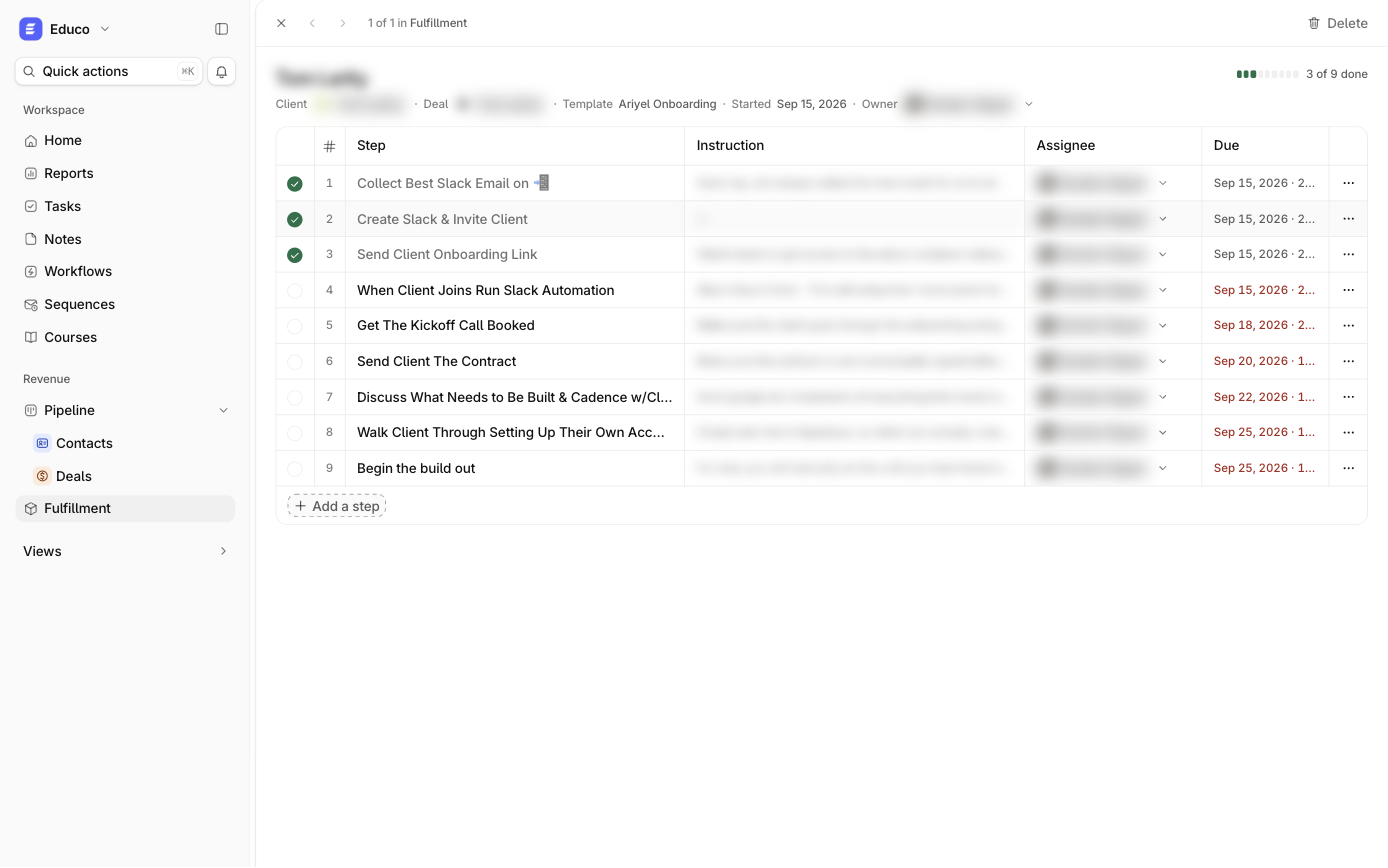
- Tick it done, or set it to To do, Waiting or Done. Waiting is for "we're blocked on the client," the most common state in onboarding.
- Reassign it or change its due date.
- Add a one-off step this client needs, without touching the template.
- Reorder or remove steps that don't apply.
Whoever is assigned a step gets a notification (email or in-app, their choice), and their open steps appear under Fulfillment on Home, next to their tasks and today's meetings. Tick the last open step and the fulfillment moves to Complete, with confetti if the template has Celebrate the last tick on.
Every client's onboarding in one list
The Fulfillment list is the view an operations lead or founder actually needs. It groups every client into:
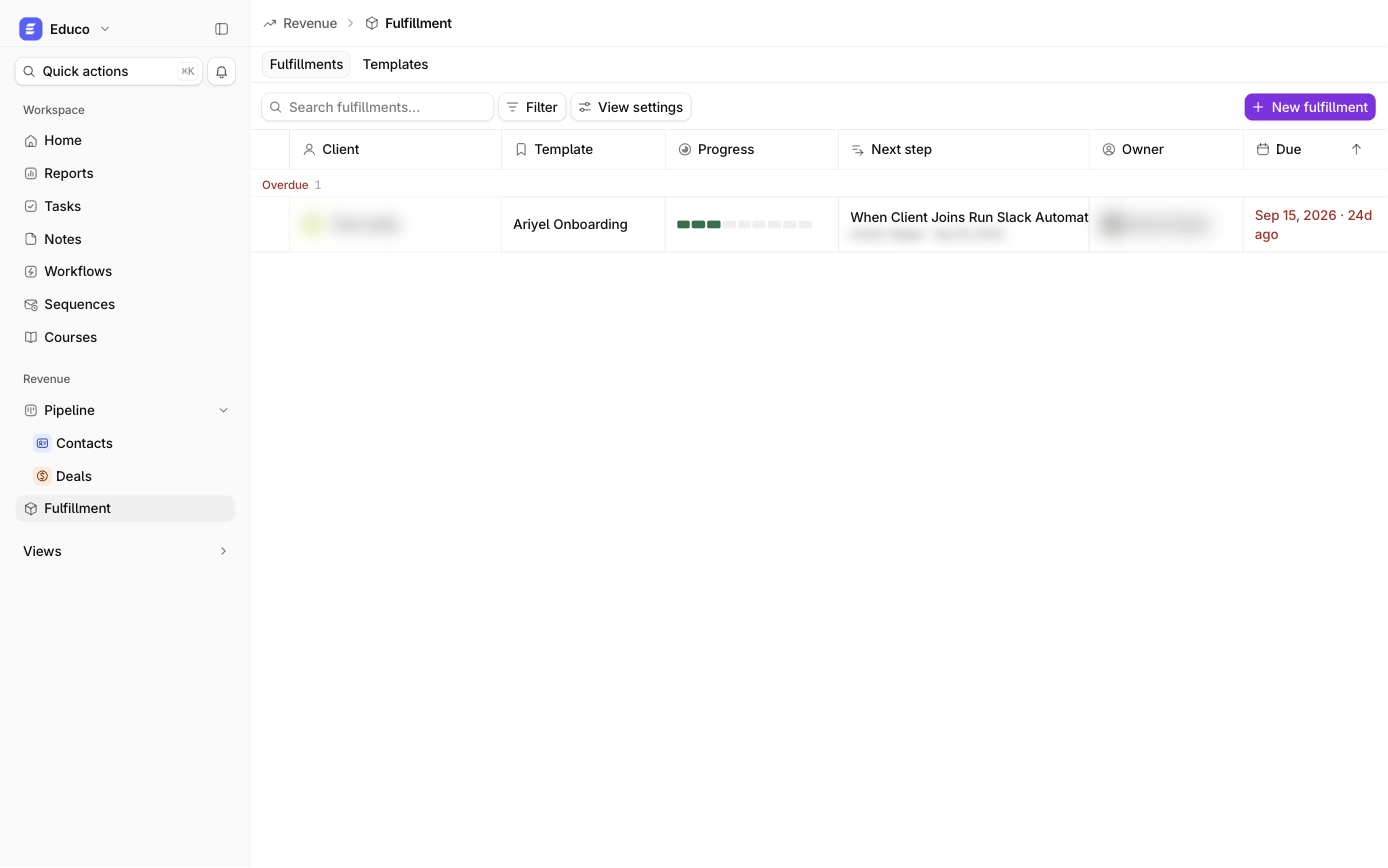
- Overdue
- Due this week (today and the next six days)
- On track
- Complete
Columns show Client, Template, Progress, Next step (with assignee and date), Owner and Due. Filters cover Client, Template, Status, Owner, Due and Next step, and you can save them as shared views, such as "My clients, overdue" or "All Enterprise onboarding, active." This is how you answer "where is every new client?" in one screen, without a status meeting.
Improve the process without breaking live clients
Templates and live checklists are kept separate on purpose:
- Editing a template changes future clients only. Checklists already running keep the steps they started with.
- Deleting a template leaves existing checklists intact.
- Duplicate a template to make a variant, for example "Retainer onboarding (Enterprise)."
So you can add the step you discovered was missing last month for every new client, and decide case by case whether current clients need it.
Sales and delivery on one record
Because fulfillment lives on the deal:
- The deal's Overview shows its Fulfillment section, Active or Complete.
- Ari's summary of a contact or deal includes delivery progress (steps done and the next step), so anyone catching up sees sales and delivery together. See Ari.
- The account manager running onboarding sees the whole sales history (emails, meetings, notes) on the same record.
How it works in Ariyel
- Write down your current onboarding for one service, exactly as it happens today, including the steps that only live in your head.
- Fulfillment → Templates → New template. Add each step with instructions, an assignee rule and a due-date offset.
- Run it on one real client from the deal's New fulfillment button.
- Ask the people doing the steps which instructions were unclear, and fix the template.
- Automate the start with a Closed won workflow.
- Save a shared "Overdue" view of the fulfillment list and review it weekly.
Implemented for you
This is the system most service businesses have never written down, and the one Ariyel's team spends the most time on in implementation. We sit with the people who actually deliver, turn your onboarding into templates for each service you sell, connect them to your pipeline with a workflow, and train the team to run from the Fulfillment list instead of a group chat. See how we implement Ariyel.
FAQ
What's the difference between client onboarding software and a project management tool? A project tool starts from a blank project. Client onboarding in Ariyel starts from the signed deal: the client, owner and sales history are already attached, and the checklist comes from a template you've refined over many clients.
Can different services have different onboarding? Yes. Build one template per service and pick the right one when you start the fulfillment, or set the template in the workflow.
Who sees the onboarding checklist? Your workspace members, according to their Fulfillment access (Full access, Read and write, or Read only).
What happens if the deal owner changes mid-onboarding? Steps were assigned when the fulfillment started. Reassign open steps on the checklist, and change the fulfillment's Owner from the top of the record.
Can I see which clients are stuck? Yes. The Overdue group shows them, and the Next step column says who owes the next action.